


What are you looking for?
Network Modeling
Harness the power of digital twins to streamline network operations and enhance cyber resiliency.
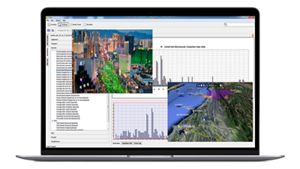

Network Modeling Empowered by Digital Twins
Digital twins, virtual replicas of physical networks, offer a unique combination of real-time data, safe experimentation, and scalability, making them a powerful choice for modern network modeling and management. Keysight EXata is a cost-effective network digital twin solution that lets you analyze, test, and optimize network behavior in a safe lab environment.
EXata minimizes hardware needs and lets you visualize and test configurations, reducing risks from network changes. High-fidelity protocol models facilitate simulations letting you predict network performance. Integrating with existing tools and Keysight products, EXata delivers the most comprehensive network testing and optimization available.
Explore the Future of Network Modeling
Watch our 2-minute video to explore how digital twins revolutionize the way we predict and optimize communication networks. See the real-world transformation of antenna design and signal quality with Keysight EXata.
Network Modeling — Defense Solutions
In today's modern era of modern warfare spanning land, sea, air, space, and cyber realms, network integration is crucial. Keysight EXata network modeling delivers advanced design and analysis tools, including a Military Radio Library, Joint Network Emulator, Underwater Network Library, and Cyber Attack Library for developing testing, and deploying resilient wired and wireless networks and communication equipment.
Specializing in multi-domain network solutions, EXata excels in analyzing operational characteristics and components of proposed and deployed networks. It crafts the highest-fidelity simulation models, detailed test scenarios, and procedures that yield predictive results for target networks or network-enabled systems with rapid turnaround. EXata supports waveform and network testing, standards conformance testing, and network management— including large-scale DOD tests like the Network Integrated Evaluations (NIEs) and JTRS networking waveforms, such as SRW, WNW MOUS, and WINT, as well as legacy radio platforms like SINCGARS and EPLARS.


Learn more about Keysight EXata for the defense industry:


Learn more about Keysight solutions for the 5G NTN industry:
Network Modeling - 5G/Non-Terrestrial Networks
As 5G advances beyond LTE, penetrating domains like Satellite Non-Terrestrial Networking (NTN), its impact spans various industries from telemedicine to smart cities to intelligent vehicle communications, It promises to revolutionize IoT and autonomous systems supporting critical infrastructure, while enhancing tactical communications for the military and first responders. EXata offers essential analysis capabilities to ensure network resiliency — considering factors like terrain, channel characteristics, user density.
In a competitive space and satellite industry, timely validation of designs and risk mitigation are crucial. EXata addresses these needs through virtual models of data, voice, and video networks, including satellites and ground stations. Our 5G and NTN libraries model real-world constellations using Two Line Elements (TLE) data with our dynamic Satellite Viewer.
Network Modeling — Smart Factories
The Keysight commitment to innovation expands as we integrate ray-tracing capabilities into our urban propagation models and collaborate with third-party tools, empowering customers to accelerate product development. Network modeling with EXata provides precise measurements, informing engineering decisions and enhancing interconnected processes for a competitive edge.
The factory floor's intricate electromagnetic environment requires advanced tools like ray tracing and custom noise models. Concurrently, smart factories require seamless integration of robots and intelligent machinery, optimizing production through continuous communication with controllers and supervisory systems. As industries transition to digital-first workflows, the role of AI-driven decision-making and data utlilization becomes increasingly pivotal in driving superior product development.

Learn more about Keysight solutions for smart factories:


Learn more about Keysight EXata for Critical Infrastructure:
Network Modeling — Critical Infrastructure
To safeguard critical infrastructure, predicting network behavior during cyber attacks is paramount. EXata Cyber Physical Systems (CPS) empowers organizations to anticipate system responses, enabling proactive measures for ongoing cyber resilience. Potential threats and bottlenecks within critical systems are identified early on, mitigating the risk of network disruptions and slowdowns andensuring uninterrupted operations.
To fortify network resilience, public utilities, and critical infrastructure stakeholders are adopting network digital modeling to replicate their environment and understand the impact of cyber threats. Integrated with OPAL-RT’s HYPERSIM or RT-LABS simulator, EXata CPS provides a complete real-time solution for the development, testing, and assessment of electrical grids with communication networks. Through network modeling and synchronized emulation of communication systems and power grid components, EXata dramatically improves infrastructure efficiency and grid reliability.
Network Modeling — Autonomous Technology
The EXata digital twin technology leads the charge in revolutionizing vehicle safety by enabling the simulation of intricate network configurations, spanning diverse environments, protocols, and mobility patterns. From bustling urban landscapes to remote highways, EXata ensures unparalleled accuracy of critical factors like vehicle mobility, pedestrian traffic, signal properties, and cutting-edge wireless technologies such as 802.11p, LTE, and 5G.
Our innovative technology empowers top automotive firms to streamline supply chains, elevate product quality, and drive innovation. As demand rises for safety and efficiency, alongside the surge in connected vehicles and advancements in communication technologies, EXata network modeling solutions align seamlessly with the industry's shifting focus towards sustainability and evolving priorities, based on IEEE and C-V2X standards.


Learn more about Keysight EXata for Autonomous Technology:
Find the Software That's Right For You

Protect Your Innovation Investment


Featured Resources


Network Modeling FAQs
A network model is a digital representation of a real-world network, which is a collection of nodes (or vertices) and edges (or links) that connect pairs of nodes. A model helps us understand the structure, behavior, and interactions within that network. There are many different types of network models, each focusing on a specific aspect of the network.
Types of network models include:
- Physical Network Models: These depict the physical layout of network devices and their connections (cables, fibers, routers, switches).
- Logical Network Models: These focus on the logical structure of the network, like protocols used and how data flows between devices.
- Performance Models: These models predict network performance characteristics like throughput, speed, and latency.
- Threat Models: These identify potential security threats to the network or vulnerabilities within the network and assess the risk.
- Network Simulation Models: These use software to create a virtual representation of the network to simulate its behavior under different conditions (e.g., increased traffic, cyberattacks). Keysight EXata is an example of a network simulation model.
In essence, network models are like digital blueprints for networks. They provide a valuable tool for anyone involved in network design, analysis, troubleshooting, optimization, or security.
Network modeling benefits industries like communications, aerospace, defense, and transportation by:
- Understanding Structure and Connectivity: Analyzing network arrangement aids resource flow comprehension
- Identifying Patterns and Trends: Revealing recurring patterns informs predictions
- Predictive Analysis: Forecasting network behavior detects issues early
- Optimization and Design: Improving efficiency and resilience, e.g., optimizing transportation routes
- Risk Assessment and Mitigation: Simulating scenarios assesses and mitigates vulnerabilities
- Decision Support: Enhancing decision-making via insights and collaboration
Overall, solutions like Keysight EXata enable analyzing systems, uncovering relationships, and informing decisions across disciplines.
Simulating network traffic and analyzing performance through network modeling involves five key steps:
- Choose Your Network Modeling Tool: Keysight EXata is the leading choice for network modeling and analysis, offering the highest fidelity and unparalleled capabilities to ensure optimal network performance, resiliency, and security.
- Build Your Network Model: Construct a model reflecting your network:
- Add devices, connections, and define the network topology
- Configure Network Traffic and Performance Metrics:
- Utilize built-in libraries for modeling protocols and traffic patterns
- Define traffic patterns and configure performance metrics
- Run Your Simulations: Execute simulations under various scenarios:
- Test peak load, specific applications, or failure scenarios
- Monitor simulations in real-time or analyze post-simulation data
- Analyze Performance:
- Evaluate results to identify bottlenecks or vulnerabilities
- Refine the model and configurations based on insights
- Optimize the real network using simulation findings
Network modeling optimizes networks by analyzing behavior and suggesting improvements. It aids in:
- Topology Optimization: Identifying inefficiencies like bottlenecks and redesigning for efficiency
- Traffic Engineering: Simulating scenarios to optimize load balancing and QoS policies
- Resource Allocation: Dynamically adjusting resources to minimize congestion
- Proactive Capacity Planning: Simulating growth to plan upgrades or expansions
- Security Risk Assessment: Simulating attacks to strengthen defenses
- Improved Decision Making: Data-driven insights inform resource allocation and upgrades
- Fault Tolerance: Designing resilient networks through simulation
- Cost Optimization: Balancing performance with cost considerations
Network modeling empowers informed decisions, enhancing performance, reliability, efficiency, and cost-effectiveness.
Network modeling enhances network security by proactively identifying vulnerabilities and assessing defenses. It offers benefits such as:
- Threat Detection and Prevention: Simulating cyberattacks to evaluate security measures
- Vulnerability Assessment: Identifying weaknesses in authentication and software
- Intrusion Detection and Response: Testing detection mechanisms and incident response
- Security Policy Compliance: Identifying and remedying non-compliant configurations
- Incident Response Planning: Simulating incident scenarios and response procedures
- Planning Security Improvements: Evaluating the impact of security upgrades
- Training and Awareness: Providing hands-on security training and fostering awareness
Overall, network modeling is crucial for proactive threat detection, incident response planning, and security policy compliance, strengthening defenses and mitigating cyber threats effectively.
Network modeling is essential for network design and planning, providing a virtual blueprint for your network. It contributes by:
- Visualization and Communication: Offering a visual representation can aid understanding, communication, and early issue identification.
- Performance Analysis and Optimization: Simulating network performance helps analyze factors and optimize configurations for optimal performance
- Scalability and Future Planning: Modeling future growth ensures capacity and efficiency, guiding infrastructure investments
- Cost-Effectiveness and Risk Reduction: Testing designs virtually saves resources, minimizes risks, and identifies issues early
- Security Considerations: Assessing security posture, simulating attacks, and implementing security measures enhance network security from the outset
Network modeling is vital for performance monitoring and troubleshooting, offering insights into network behavior and aiding issue resolution. Here's how it supports these activities:
Performance Monitoring:
• Baseline Establishment: Define expected network behavior and compare real-time data to detect deviations
• Performance Optimization: Experiment with configurations and policies to enhance efficiency and reliability
• Continuous Improvement: Iteratively monitor, analyze, and optimize performance over time
• Visualization of Traffic Patterns: Visualize traffic flow to identify bottlenecks and congestion
• Predictive Analysis: Anticipate performance issues by simulating traffic scenarios and configurations
Troubleshooting:
• Isolation of Issues: Use models to pinpoint root causes of problems
• Testing Solutions: Test potential fixes in a safe environment before implementation
• Improved Communication: Facilitate communication among stakeholders by providing a visual representation of the network
Additional Benefits:
• Capacity Planning: Predict future performance requirements to prevent bottlenecks
• Reduced Downtime: Minimize network downtime by identifying and resolving issues faster
• Improved Efficiency: Streamline troubleshooting workflows for quicker resolution
• Proactive Network Management: Anticipate and prevent performance degradation
Overall, network modeling is invaluable for maintaining optimal network performance and reliability.
Effective network modeling relies on meticulous planning and adherence to best practices. Here are key practices:
- Collaborate Across Teams: Engage multidisciplinary teams for diverse expertise.
- Define Goals and Requirements: Clearly outline objectives to guide model complexity.
- Gather Accurate Data: Ensure up-to-date information for precise modeling.
- Choose the Right Tool: Select a tool aligning with needs and expertise, like Keysight EXata.
- Document Your Model: Transparently record assumptions and decisions for accountability.
- Start Simple, Increase Complexity: Begin basic and progress gradually to avoid overwhelm.
- Validate Your Model: Compare model behavior with real-world observations for accuracy.
- Use Network Modeling for Decision Making: Utilize model insights for informed decisions.
- Maintain Model Accuracy: Regularly update the model to reflect network changes.
- Iterate and Refine: Continuously refine the model based on feedback and new data.
Following these practices ensures effective network models that drive informed decisions and continuous improvement.
The difference between free and paid network modeling tools lies in their features, support, and licensing.
Free tools offer basic functionalities like topology visualization and limited device modeling, while paid tools provide advanced features such as comprehensive traffic simulation, security modeling, and scalability. Paid tools also offer robust support, including documentation, training, and dedicated customer service.
In terms of security, paid tools typically offer more robust features to safeguard sensitive network data. While free tools may have limitations in customization and integration, paid tools offer greater flexibility and integration capabilities.
Consider your specific needs and budget when choosing between free and paid tools. Free tools suffice for basic tasks, while paid tools are ideal for complex networks and advanced requirements. Keysight EXata offers unparalleled precision and fidelity in crafting, testing, and refining communication networks models across diverse domains—from undersea depths to celestial heights.
Want help or have questions?


